You’ve probably used Perplexity and Google separately. You may have opened NotebookLM once, been impressed, and then forgotten about it. This tutorial teaches the specific two-tool research workflow that saves professional researchers hours per week — step by step, with real prompts that work.
Let me describe what I used to do when I needed to understand a new topic deeply.
I’d open eight tabs. Three news articles, two Wikipedia pages, an academic paper I couldn’t actually access, and two industry reports that required email sign-up to read. I’d spend forty-five minutes reading across all of them, losing the thread between each one, trying to synthesise information that appeared in different formats with different emphases. I’d end up with a rough mental model, one page of notes that I’d have to rediscover in three days, and the persistent feeling that I’d missed something important.
That process is largely obsolete.
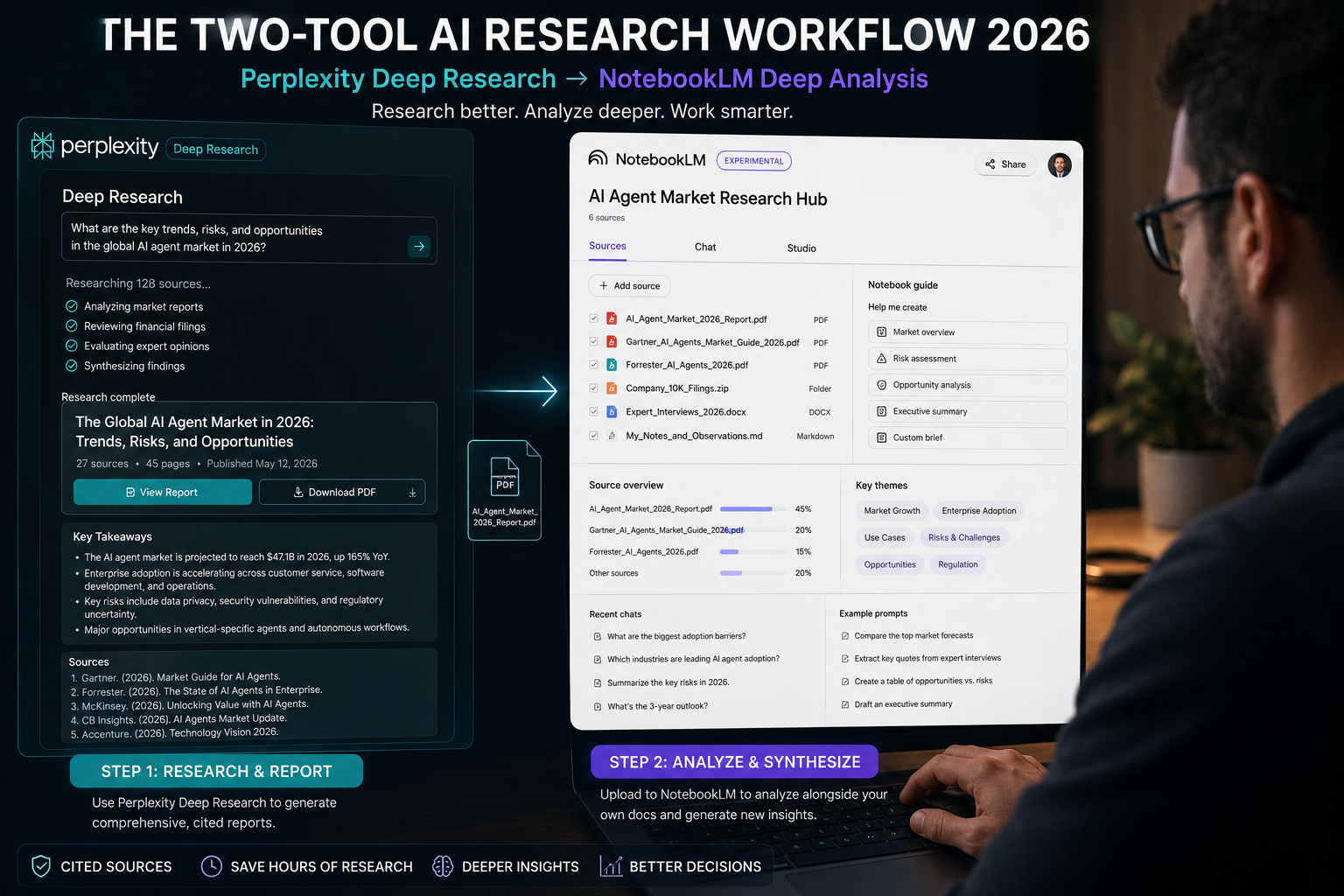
Perplexity’s Deep Research mode analyses hundreds of sources, reasons through what they say in relation to each other, and produces a comprehensive, cited report in under three minutes. NotebookLM then lets me interrogate that report alongside my own documents — asking questions across all sources simultaneously, with answers that cite exactly where the information came from.
Together these two tools form the most powerful research workflow I’ve used. The individual tools are useful. The combination is extraordinary. Here’s the specific workflow.
Why Perplexity First — Not Google, Not ChatGPT
Google is excellent at retrieval. You search, you get links, you click and read. The synthesis — what all these sources say in relation to each other — is entirely your job.
ChatGPT is excellent at synthesis. But it synthesises from training data with a cutoff, generates confident-sounding text that may be outdated or hallucinated, and produces no citations you can verify.
Perplexity does something different. It searches the live web in real time, reads multiple sources in parallel, reasons about what they say in relation to your question, and produces an answer with numbered citations you can click to verify every claim. Every fact has a source. Every source can be checked.
This is not a small distinction. For research that you’ll rely on — that will inform decisions, go into documents, or be shared with others — the difference between plausible-sounding text and cited-and-verifiable information is enormous.
Perplexity’s Deep Research mode goes further. It doesn’t just answer a question — it analyses your research question, generates a structured research plan, executes dozens of searches in sequence, reads through the results, and produces a multi-page report comparable to what a competent analyst might produce in a few hours. In under three minutes.
The accuracy benchmarks support the experience: Perplexity Deep Research scores 93.9% on SimpleQA, a factuality benchmark involving thousands of questions requiring accurate, specific answers. That’s the foundation for trusting its outputs — while still clicking through citations for anything important.
Getting Deep Research Right: The Prompt That Determines Your Output
Deep Research is only as good as the question you ask it. The single biggest difference between Perplexity beginners and power users is prompt specificity.
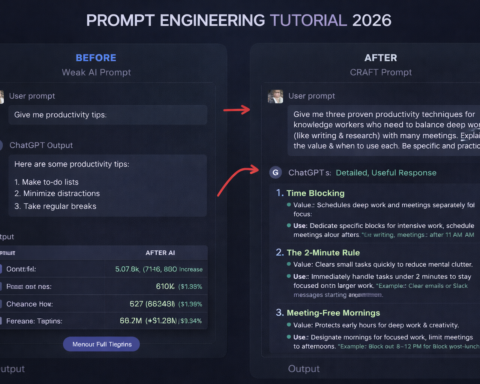
Weak prompts produce weak reports:
- “AI in healthcare”
- “Climate change solutions”
- “How companies use data”
These are topics, not research questions. Perplexity will produce a wide, shallow survey of each.
Strong prompts produce actionable reports:
- “What specific AI tools are being deployed in hospital radiology departments in 2026, what are the documented accuracy improvements compared to unassisted radiologists, and which systems have received FDA clearance?”
- “What are the most cost-effective renewable energy solutions for commercial buildings under 50,000 square feet in regions without grid-scale solar resources, based on 2025-2026 project data?”
- “How are mid-size professional services firms (100-500 employees) using AI for client-facing work in 2026, what tools are they using, and what outcomes have been documented?”
The difference: specific subject, specific scope, specific type of evidence you want. Perplexity’s research plan — the sequence of searches it executes — is shaped by your question. A specific question produces a specific research plan that produces specific, usable findings.
The “Persona-Action-Constraint” framework, which Perplexity researchers have documented as producing the strongest outputs: Act as a [specific role]. Research [specific topic with explicit scope]. Include [specific types of evidence]. Exclude [what you don’t need].
Example: “Act as a competitive intelligence analyst. Research how B2B SaaS companies in the project management category are using AI to differentiate their products in 2026. Focus on product features, not marketing claims. Include pricing information where available. Cite only product announcements, user reviews, or direct product documentation — exclude analyst speculation.”
That level of specificity produces a report you can actually use.
Running Deep Research: Step by Step
Go to perplexity.ai. In the search bar, look for the mode selector — it will show options including Web, Academic, and Deep Research.
Select Deep Research before submitting your query. This is the step many users miss — standard search mode will produce a good quick answer, not the multi-page analytical report that Deep Research generates.
Type your specific research question and submit. You’ll see Perplexity begin its research process — it generates a plan, runs multiple searches in sequence, and shows you the intermediate steps as it works. This takes 2-4 minutes, not the instant responses you’re used to from chatbots. That time is the model working through dozens of sources.
When the report appears, read the entire thing before clicking any citations. Get the full picture first. Then go back and verify the specific claims that matter most to your use case — statistics, quotes, named cases, product features. Click the citation numbers and check the original source.
If the report surfaces gaps or raises new questions, ask follow-up questions in the same thread. Perplexity maintains context across a conversation, so follow-up questions refine the original research rather than starting over.
“Can you expand specifically on [one finding] with more implementation detail?” “What are the main criticisms or limitations of the approaches described?” “Which of the sources cited would be most useful to read in full, and why?”
Save the final report. Copy it as text or export as PDF. This is the input to NotebookLM.
Where NotebookLM Comes In — And Why You Need Both
Perplexity is a research and discovery tool. It finds, synthesises, and cites. It does not analyse your specific documents, your company’s internal data, or the papers and reports you already have. It searches the web. That’s both its strength and its limitation.
NotebookLM operates differently. You give it a set of documents — your Perplexity report, academic papers, internal research, uploaded PDFs, company documents — and it becomes an AI assistant that knows only those sources. It won’t hallucinate information from outside what you’ve provided. When you ask it a question, it answers using quotes and citations from your specific documents.
The combination:
Perplexity discovers what exists in the world: the current state of a topic, what companies are doing, what research has been published, what data is available.
NotebookLM helps you analyse specific documents you’ve collected: compare findings across multiple papers, find contradictions between sources, extract specific information from dense documents, build structured summaries from your source library.
Together, they cover the full research cycle. Discovery and synthesis (Perplexity) + deep analysis of your specific sources (NotebookLM).
The NotebookLM Workflow: Step by Step
Go to notebooklm.google.com. Sign in with a Google account. Click “Create Notebook.” Name it descriptively — “AI Healthcare 2026 Research” rather than “Notebook 1.”
Click “Add Sources.” Upload your Perplexity report (as a PDF or paste the text directly), plus any additional documents you want to include. Academic papers you’ve downloaded, industry reports, internal research, competitor product documentation. NotebookLM supports PDFs, Google Docs links, web URLs, and plain text. Keep it to 5-15 highly relevant sources to start — too many sources dilutes the quality of responses.
Once your sources are loaded, NotebookLM shows you the source panel on the left and a chat interface on the right. The chat interface is where you work.
Start with broad orientation questions:
- “Give me a one-paragraph summary of the main argument in each of my sources.”
- “What are the three most important findings across all these documents?”
- “Are there any significant contradictions between the sources I’ve uploaded?”
Then move to specific extraction questions:
- “Extract every statistic about [specific metric] that appears across my sources, with the source and page number.”
- “Which companies are mentioned as implementing [specific technology], and what do my sources say about each one’s approach?”
- “What gaps or unanswered questions do my sources identify?”
NotebookLM’s answers will include specific quotes from your documents with clickable citations that take you back to the exact location in the original source. This means you can verify every claim before using it, and you can find the exact passage you need without manually re-reading hundreds of pages.
The Audio Overview feature generates a podcast-style conversation between two AI voices discussing your sources. This sounds gimmicky and is genuinely useful: listening to your research explained conversationally while commuting or doing other work is a different cognitive mode from reading, and it often surfaces connections you’d miss in a linear read-through.
Real Research Workflow: From Question to Finished Output
Here’s the complete workflow from a research question to a finished document:
Step 1 (Perplexity, 5 minutes): Submit your specific research question to Deep Research. Wait for the report. Read it. Ask two or three follow-up questions to fill gaps. Save the report.
Step 2 (Source collection, 15-30 minutes): From the Perplexity report’s citations, identify 3-5 sources worth reading in full. Download PDFs if available. Add any existing internal documents relevant to your question.
Step 3 (NotebookLM, 20-30 minutes): Upload your Perplexity report and collected sources. Ask orientation questions. Extract specific information. Use the Q&A interface to find exactly what you need across all sources simultaneously.
Step 4 (Your analysis, as long as it takes): This step is still yours. NotebookLM found and organised the information. The judgment about what it means, how it applies to your specific situation, what decision to make or argument to make — that’s your work. AI accelerates the information gathering and organisation. The thinking that builds on the information is the human contribution that no tool replaces.
Total time with the workflow: 45-60 minutes for thorough research on most topics. Total time without the workflow: 3-5 hours for comparable coverage.
That’s not an exaggeration. It’s what happens when you stop manually scanning search results and start directing AI tools that know how to search, synthesise, and organise information at machine speed.
The One Warning You Should Take Seriously
Both tools can be confidently wrong. Perplexity’s citation system makes it much harder to be wrong without you noticing — but not impossible. NotebookLM is constrained to your sources but can misread or misrepresent them.
The rule: verify before you use. Click citations on Perplexity claims that matter. Click NotebookLM citations and check the passage it’s citing. If a number will appear in a published document, a presentation, or a decision with real consequences — verify it against the original source.
This takes two minutes. It’s the difference between “I used AI to research this” and “I used AI to research this and it holds up.” Make it a habit from the first time you use the workflow.