The single biggest reason people get disappointing results from ChatGPT, Claude, and Gemini isn’t the AI — it’s the prompt. Here’s the complete guide to writing prompts that consistently produce outputs you can actually use.
Here’s something most people figure out after weeks of frustration, but you can know right now: the AI isn’t the problem.
When ChatGPT gives you a generic, wishy-washy response that reads like it was written by a committee and reviewed by legal — that’s not a limitation of the model. GPT-5.4, Claude Opus 4.6, Gemini 3.1 Pro — these are genuinely powerful systems. They’re capable of producing analysis that rivals senior consultants, code that senior developers ship, writing that professionals sign their names to.
The gap between what most people get and what these tools can produce is almost entirely explained by prompt quality. And prompt quality is a learnable skill with a clear structure.
This guide teaches you that structure. By the end, you’ll have a framework you can apply immediately, five specific techniques that work across every major AI tool, and a set of copy-paste templates for the most common use cases.
Why Your Prompts Are Probably Failing
Before the techniques, it’s worth understanding why most prompts underperform. The patterns are consistent.
The problem is almost never ambition. It’s ambiguity.
When you write “write a blog post about AI tools,” you’ve given the AI four things it has to guess: who the audience is, what tone is appropriate, how long it should be, and what angle or perspective you want. An AI that guesses wrong on any one of those — and it has no basis not to guess — produces something that misses your actual need.
The 80/20 rule of prompt engineering: mastering the basics — clear context, specific instructions, defined format — gets you 80% of the way to expert-level results. The advanced techniques refine the remaining 20%. Most people are still working on the basic 80%.
The fix is not clever wording. It is more information, structured clearly.
The CRAFT Framework: Your Foundation
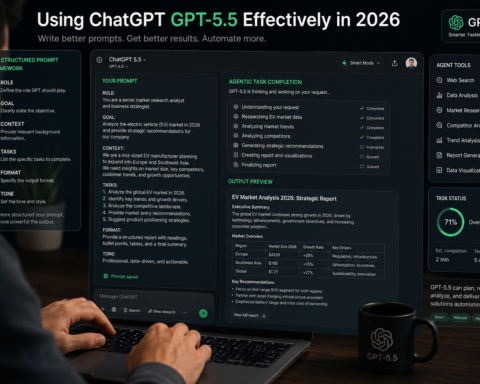
The CRAFT framework is the single most reliable prompt structure for everyday use. Every component has a specific job, and including all five dramatically reduces the gap between what you ask for and what you get.
C — Context. Give the AI the background it needs but doesn’t have. Who are you? What’s the situation? What has already been done? What constraints exist? An AI with no context about your business, your audience, or your purpose will fill those gaps with generic assumptions.
R — Role. Tell the AI who it should be. “Act as a senior financial analyst” produces profoundly different output than “Act as a friendly tutor explaining to a beginner.” The role establishes expertise level, vocabulary, tone assumptions, and the kind of judgment the AI brings to the task.
A — Action. State exactly what you want done, using specific verbs. Write, analyse, compare, summarise, critique, draft, outline, convert, translate. Vague action words — “help me with,” “tell me about,” “write something on” — force the AI to guess the task, not just the context.
F — Format. Specify how the output should look. Bullet points, numbered list, table, prose, template with blanks, JSON, a 3-paragraph essay, a 500-word email with a specific structure. If you don’t specify, you’ll get whatever the AI defaults to — which rarely matches what you had in mind.
T — Tone. Define the voice. Professional but conversational. Authoritative without being academic. Direct and data-driven. Warm and empathetic. Tone specifications dramatically affect how an output lands with its intended reader.
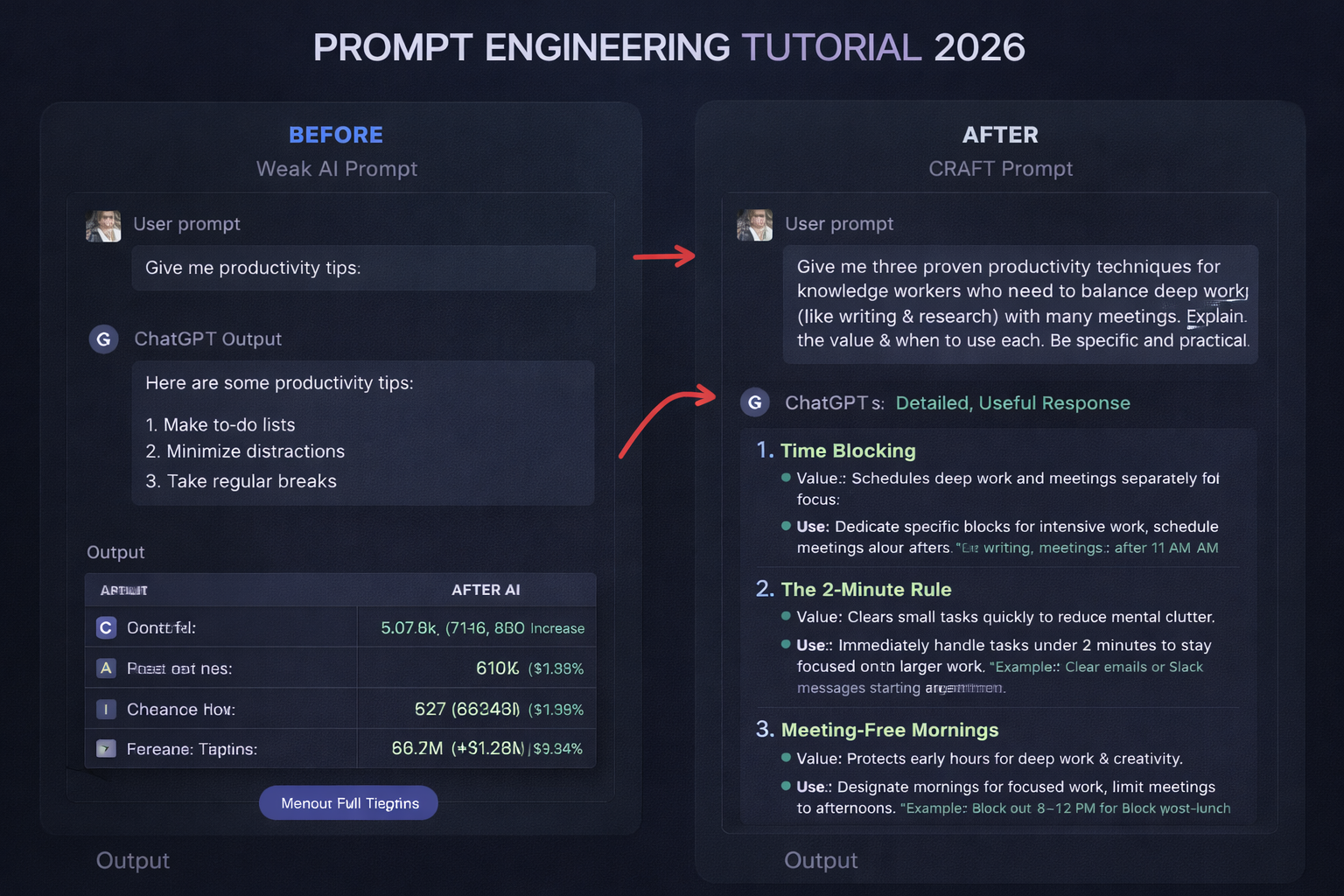
Weak prompt: “Write a blog post about remote work productivity.”
CRAFT prompt: “You are a productivity consultant who has coached 200+ remote teams over five years. Context: This blog post is for a B2B SaaS company targeting operations managers at growing startups (50-200 employees). Action: Write a 700-word blog post that challenges one common remote work assumption, backs it with a specific example or data point, and ends with three actionable steps. Format: Introduction hook, three sections with subheadings, conclusion with CTA. Tone: Direct and practical, confident without being preachy — like advice from a smart friend who happens to know this area well.”
The second prompt leaves almost nothing for the AI to guess. The result will be dramatically more useful and dramatically less generic.
Technique 1: Chain-of-Thought Prompting
Chain-of-thought prompting is the most powerful technique for tasks that require reasoning rather than just generation. The core idea is simple: ask the AI to show its thinking before reaching a conclusion.
When you ask directly “Which of these two marketing strategies is better?” the AI pattern-matches to a confident-sounding answer. When you ask it to reason step by step, it actually works through the problem — and catches errors it would otherwise make.
How to use it: Add “Think through this step by step before answering” or “Walk me through your reasoning before giving your recommendation” to any prompt that involves decisions, analysis, or complex problems.
Example: “I’m deciding between spending my next six months building SEO content or investing in a paid LinkedIn ads strategy for my B2B consulting practice (annual revenue $200K, 3 clients, targeting HR directors at mid-market companies). Think through the considerations step by step — market fit, timeline to ROI, resources required, risk — before making your recommendation.”
The answer you get will be substantively better than “SEO takes longer but compounds; LinkedIn gives faster results but requires ongoing spend.” The reasoning reveals assumptions, flags trade-offs, and produces a recommendation you can actually evaluate.
This technique is particularly valuable for: architecture decisions, debugging, data analysis interpretation, strategic choices, any task where the reasoning matters as much as the conclusion.
Technique 2: Few-Shot Prompting — Teach by Example
Instead of describing what you want, show the AI. Give it 2-3 examples of your desired output, and it will pattern-match far more accurately than any instruction you could write.
This is especially powerful for matching a specific voice or format.
Example:
“I need you to write product descriptions in my brand voice. Here are three examples of descriptions that match what I want:
Example 1: [paste an existing description you like] Example 2: [paste another] Example 3: [paste another]
Now write a product description for [new product], using the same voice, length, and structure.”
The AI extracts your implicit style rules from the examples — sentence length, adjective density, technical vs. approachable language, how you handle features vs. benefits — and applies them consistently. No amount of verbal instruction captures this as precisely as actual examples.
Use few-shot prompting when: you have a specific voice you’re trying to match, you want consistent formatting across many outputs, or when verbal descriptions of what you want are hard to make precise.
Technique 3: Negative Prompting — Define What You Don’t Want
Borrowed from image generation but enormously effective for text, negative prompting tells the AI what to avoid. Sometimes it’s easier — and more precise — to define exclusions than inclusions.
Example:
“Write a technical blog post introduction about vector databases.
Do NOT: use the phrase ‘In today’s world,’ open with a rhetorical question, use the word ‘revolutionary,’ start with a dictionary definition, or include filler phrases like ‘It goes without saying.'”
This eliminates the generic AI-sounding filler that makes content immediately recognisable as machine-generated. The AI knows these tendencies are in its training data; explicitly excluding them steers it away.
Build your own negative prompt library based on patterns you keep having to edit out. Common additions: “Do not use bullet points unless essential,” “Do not repeat the question in the opening,” “Do not hedge every statement with ‘it depends’ without being specific.”
Technique 4: The Iterative Refinement Loop
One of the most common mistakes is treating the first AI response as the final output. The first response is a draft. The third or fourth response — after specific, targeted refinement requests — is usually the useful one.
The pattern that works consistently: generate, critique, refine.
Round 1: Write the first version using your CRAFT prompt. Round 2: “The second paragraph is too vague. Rewrite it with a specific example and a concrete number. Keep everything else.” Round 3: “The closing call-to-action is weak — it doesn’t create urgency. Rewrite the last two sentences only.” Round 4: “Now reduce the overall length by 20% by cutting the least essential sentences, without losing the core argument.”
Each round builds on the last. You get a production-ready result instead of a first draft, without starting over from scratch. The specific, targeted nature of each refinement request is what makes this work — “make this better” is too vague to produce improvement, but “cut the second paragraph and replace it with one clear, specific example” gives the AI precise direction.
Technique 5: The Role Assignment Upgrade
Role prompting works, but most people underuse it. The common version — “You are an expert in X” — is a starting point. The version that produces significantly better results is: specific role + domain + audience awareness + relevant experience.
Basic: “You are an expert marketer.”
Upgraded: “You are a B2B content marketer with 10 years of experience in the SaaS industry, who has written for companies like Salesforce, HubSpot, and mid-market CRMs. You know that your audience is pragmatic and sceptical of hype. You write with authority but avoid buzzwords.”
The additional specificity does two things: it aligns the model’s expertise to your specific domain rather than “marketing” generically, and it establishes the audience relationship the AI should maintain throughout the response.
For technical tasks, add the implied audience: “You are a senior backend engineer explaining this to a mid-level developer who understands basic REST APIs but hasn’t worked with message queues before.”
The role shapes every word, every vocabulary choice, every assumption about what needs explanation. Get it right and the entire output shifts.
Practical Templates You Can Use Today
Copy these, adapt them to your situation, and you’ll immediately get better results.
Meeting summary: “You are a professional executive assistant. Context: The following are raw meeting notes from a 45-minute strategy session. Action: Produce a meeting summary that includes: (1) key decisions made, (2) action items with owner and deadline, (3) open questions requiring follow-up, (4) a one-paragraph executive summary for stakeholders who weren’t present. Format: structured with headers. Tone: Professional and crisp — no more than 400 words total. [Paste notes]”
Email response: “You are a professional business communicator. Context: I received this email [paste email] and need to respond. The relationship is [describe]. Action: Draft my response that [state your goal — declines, asks for more time, agrees with conditions, etc.]. Format: professional email with subject line. Tone: [Direct and brief / Warm and collaborative / Firm but respectful]. Do not start with ‘I hope this email finds you well.'”
Analysis request: “You are a strategic analyst. Think through this step by step. Context: [paste the data or situation]. Action: Analyse [specific question] by examining [specific angles you want covered]. Show your reasoning before your conclusion. Format: reasoning section followed by clear recommendation. Tone: direct and data-driven.”
Content first draft: “You are [role with specifics]. Context: [who the reader is, what they need, what they already know]. Action: Write [format + length] that [specific outcome — teaches X, persuades reader of Y, explains Z]. Do NOT: [list of patterns to avoid]. Tone: [specific voice description].”
The One Habit That Compounds Everything
Save the prompts that work. Every time you get an output you’re genuinely satisfied with, save the prompt in a notes doc, organised by use case: writing, research, analysis, coding, communication.
Over two or three months, you build a personal prompt library — a collection of reliable patterns calibrated to your specific voice, your specific use cases, and your specific standards. The productivity advantage compounds because you stop rebuilding from scratch.
The professionals getting the most out of AI tools in 2026 are not the ones with the best individual prompts. They’re the ones with a system — a library of proven prompts they iterate on, combined with the skill to generate new ones quickly when situations require it.
Start that library today with the first prompt from this guide that you use.