Everyone who uses Cursor says the same thing: “I can’t go back to regular VS Code.” After three months of daily use across real projects, I understand why. I also understand the token burn problem, the crashes in large codebases, and who Cursor is definitely not for. Here’s the honest version.
There’s a particular kind of developer experience shift that happens when a tool stops feeling like a tool and starts feeling like a collaborator. The first time Cursor understood what I was trying to do — not what I typed, but what I actually meant, across five files, with the right architectural context — was the moment I stopped treating it as an experiment and started treating it as part of how I work.
That was three months ago. I’ve used it every day since, across a React frontend, a Python API service, two internal tools, and enough debugging sessions to know both its ceiling and its floor.
This review is what I actually experienced. Not what’s on the landing page.
What Cursor Actually Is in 2026
Most AI coding tools in 2026 are one of two things: a plugin that adds AI autocomplete to your existing editor (GitHub Copilot), or a terminal agent that works outside your IDE entirely (Claude Code). Cursor is the third category: a complete VS Code fork with AI built natively into every layer of the editor.
That distinction matters because of what it enables. When you ask Cursor about your code, it’s not looking at the file you have open. It indexes your entire project — every function, every type, every dependency relationship — and holds that context when you ask questions or request changes. When you ask “why is this authentication middleware failing?” you get an answer that knows your specific codebase, not a generic answer about authentication middleware.
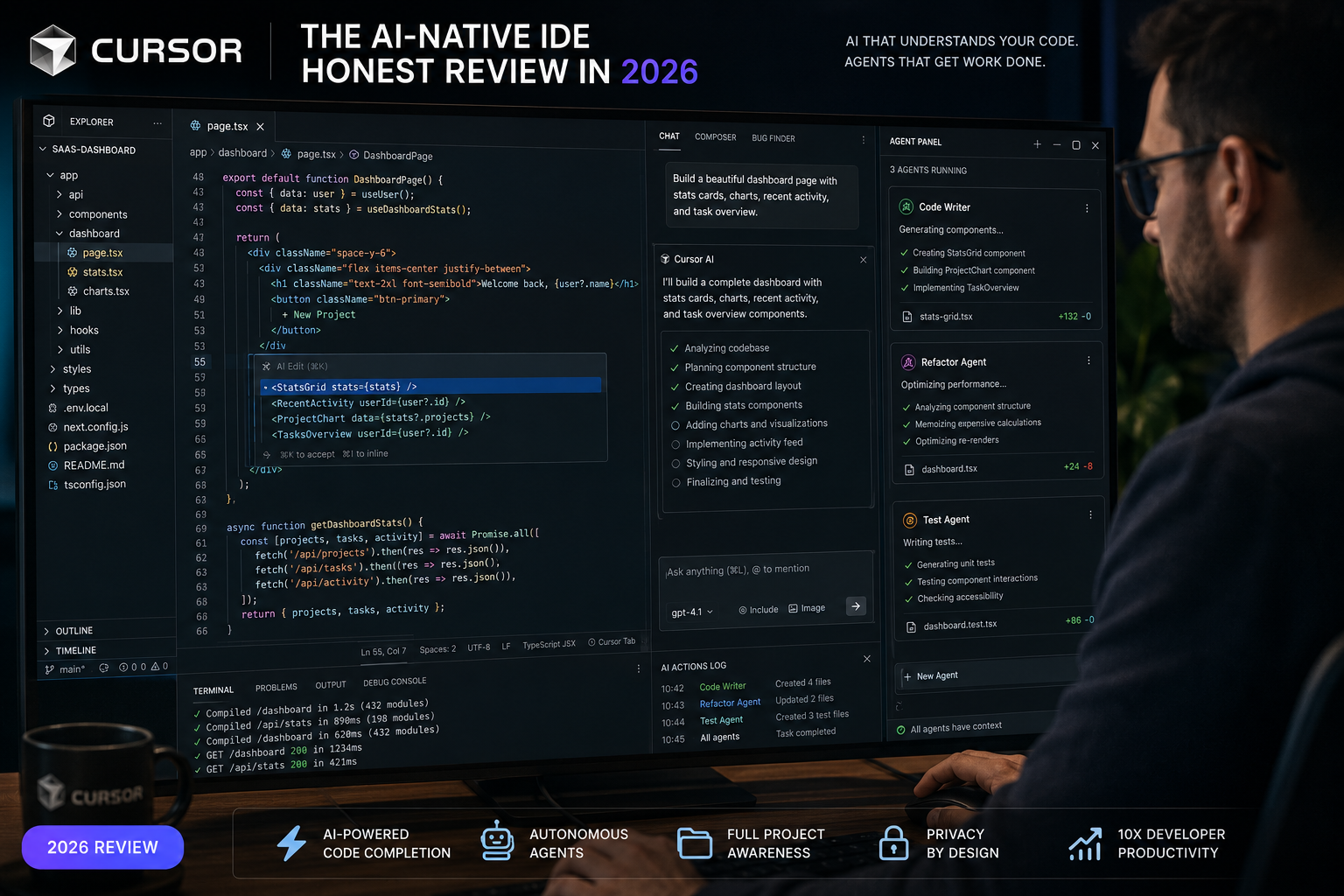
In 2026, Cursor 3.0 rebuilt its agent architecture around the Agents Window — a panel where multiple AI agents can run in parallel on different tasks. You can have one agent working through a bug fix, another drafting a new feature, and a third running tests — all simultaneously, all with awareness of the shared codebase. Background agents work while you’re reviewing something else. You review the diffs when they surface, not the process of creating them.
The model access is genuinely broad. Cursor Pro gives you access to Claude Opus 4.7, GPT-5.5, Gemini 3.1 Pro, and Grok — at $20/month. You switch between them based on the task. Claude for complex multi-file reasoning, GPT-5.5 for agentic coding and terminal tasks, Gemini when you need the large context window. You stop thinking about which model and start thinking about which task.
The Experience: What Actually Works
Tab autocomplete is genuinely different. Cursor’s Supermaven engine achieves a 72% acceptance rate — meaning almost three-quarters of its autocomplete suggestions are used as-is. The previous generation of autocomplete tools (Copilot-style single-line suggestions) felt like hitting Tab to approve or Escape to reject every few seconds. Cursor’s suggestions span multiple lines, respect your context, and arrive fast enough that the friction mostly disappears.
The specific thing that impressed me most: Cursor predicts where I’m going to type next after accepting a suggestion. When you finish implementing a function, it often has the test stub or the import statement ready before you’ve moved the cursor. It’s a small thing that compounds over hours.
Composer for multi-file edits. The Composer feature (Cursor’s multi-file generation mode) lets you describe what you want to change and have Cursor execute it across your relevant files simultaneously. Adding a new API endpoint used to mean touching the route file, the controller, the service layer, the types file, and the tests. With Composer, you describe the endpoint and Cursor handles the coordination.
This is where the “can’t go back” feeling comes from. The amount of cognitive load involved in multi-file changes — keeping track of what touches what, not forgetting to update the types — is real. Cursor absorbs most of it.
The .cursorrules system. You can define exactly how Cursor should write code for your specific project: framework preferences, naming conventions, architectural patterns, testing standards. These rules get applied automatically across every suggestion and generation. For a team with established standards, this means AI output that fits your existing patterns rather than requiring constant correction. This customisation capability is absent from most competitors.
The Experience: Where It Falls Short
Token burn in auto mode. The most consistent complaint from power users, and mine as well. Cursor’s agent mode, when left to run without tight scope, burns through tokens rapidly. You give it a complex task, it plans an ambitious implementation, and you find your monthly request allocation draining faster than expected. The solution — breaking tasks into smaller, scoped requests — defeats some of the convenience that makes agent mode valuable.
The credit-based pricing system also creates friction. On the Pro plan ($20/month), you get 500 fast requests before slower service kicks in. For daily power users, this ceiling can feel tight during intensive sessions. The Business plan ($40/seat/month) raises the limits, but for individual developers who want predictable costs, the token economy requires active management.
Performance in large codebases. This is genuinely a problem that the team acknowledges. Repositories over a few hundred thousand lines of code produce noticeably slower responses and occasional context degradation. Cursor is excellent in mid-size projects. In very large monorepos, the experience isn’t as smooth. Teams running enterprise-scale codebases often find they need to be selective about what Cursor indexes.
Crashes more than it should. Three months of daily use produced a number of unexpected crashes — maybe one per week during intensive agent sessions. They’re not data-losing; Cursor recovers cleanly. They’re annoying. The community forums suggest this is a known pattern with heavy background agent use and is being actively worked on. It hasn’t stopped me from using the tool, but it’s worth knowing going in.
It only works if you use VS Code. This is a constraint, not a flaw, but it’s decisive for a significant portion of developers. If you’re on JetBrains, Vim, Neovim, or Emacs, Cursor doesn’t help you at all. GitHub Copilot, which integrates across all major editors, has a structural advantage here for teams with diverse editor preferences.
Cursor vs GitHub Copilot: The Actual Comparison
After using both seriously, here’s the honest comparison.
Copilot installs in minutes into whatever editor you already use. It achieves approximately 46% code generation for active users. It integrates deeply with GitHub’s ecosystem — issues, pull requests, code review — in ways Cursor doesn’t. It costs $10/month at the individual level, half of Cursor’s price.
Cursor’s autocomplete acceptance rate (72%) is higher than Copilot’s in independent testing. Its multi-file context understanding is noticeably stronger. Its model flexibility — switching between Claude, GPT-5.5, and Gemini — is a genuine advantage. Its agent mode for complex tasks goes further than Copilot’s agent capabilities in 2026.
The gap: Copilot performs well on tasks touching one or two files. Tasks requiring changes across 10+ files with architectural implications produce noticeably more mistakes from Copilot than from Cursor’s Composer. That’s the real differentiation for complex projects.
Choose Copilot if: You don’t use VS Code. Your team has heterogeneous editor preferences. You primarily work on relatively contained files and features. You want reliable AI assistance without switching your entire development environment.
Choose Cursor if: You’re a VS Code user doing serious daily development. You regularly work on multi-file changes or complex refactors. The productivity gains of deep context awareness are worth the higher price and steeper setup.
Cursor vs Claude Code: Different Tools, Better Together
The professional developer stack in 2026 increasingly combines both. Cursor for daily editing. Claude Code for complex, autonomous multi-step tasks.
The combination is stronger than either alone. Cursor’s Agents Window and immediate feedback loop make it ideal for iterative development work — you’re in the flow of coding, accepting suggestions, reviewing diffs, making small course corrections. Claude Code’s terminal-native design makes it ideal for larger tasks where you want to describe an objective and step away while it executes.
One developer’s description matches my experience: “Cursor does the continuous work. Claude Code does the deep work. I flip between them depending on what I’m trying to accomplish.”
The Verdict: Worth It or Not?
For developers who write code seriously for 4+ hours a day and use VS Code: yes. The productivity gains compound. The time I don’t spend on boilerplate, typing the same patterns, or manually coordinating multi-file changes is real and it adds up to hours per week.
For developers who code part-time, students learning, or anyone working primarily in a non-VS Code environment: start with GitHub Copilot’s free tier or Codeium’s free option first. Get a feel for what AI-assisted coding does for your workflow. If you hit ceilings, that’s when Cursor Pro earns its price.
For teams considering requiring Cursor enterprise-wide: audit your editor distribution first. If more than 30% of your developers are on JetBrains or Vim, the friction of editor change may outweigh the productivity gains from Cursor specifically. Copilot’s compatibility advantage is real in mixed-editor environments.
The “can’t go back” feeling is genuine. It comes from the same place that made IDEs irreplaceable for developers who’d previously worked in text editors — not because you couldn’t write code without it, but because the ergonomics of working with it are so much better that going back feels like choosing to work harder.
After three months, I haven’t gone back.
Rating: 4.5/5 — the best AI-native IDE for VS Code developers in 2026, with real limitations in very large codebases and a token economy that requires active management.